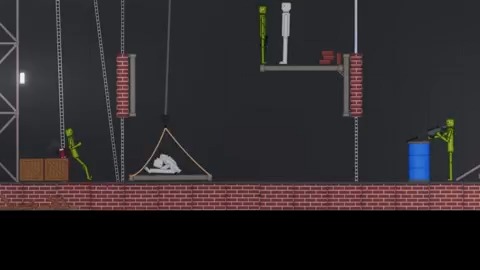
Ragdoll Playground is a free-form physics workbench where the interesting result comes from the scene you design rather than a fixed finish line.
Place a character, add an object or hazard, and start the interaction. A clear setup makes it easy to see why something moved, broke, bounced, or launched in an unexpected direction.
Once the basic reaction makes sense, add another element and test again. The sandbox becomes more entertaining when complexity grows from a working idea instead of random screen-filling clutter.
How to play Ragdoll Playground
- Press Play to open Ragdoll Playground in the shared frame.
- Choose characters, props, and tools from the game menus.
- Arrange a small scene and trigger the physics interaction.
- Reset, change one variable, and compare the new result.
Ragdoll Playground tips
- Start with two or three active objects.
- Leave visible space between stages of a chain reaction.
- Reset before an overloaded scene begins to slow down.
Use Ragdoll Playground like a small physics lab
A good Ragdoll Playground scene starts with a question. What happens if one moving object strikes a character from this angle, or if a prop falls from a different height? Place only the elements needed to test that idea, trigger the simulation, and watch the complete result. A small experiment makes cause and effect visible instead of hiding it inside random motion.
After the first run, move one object or change one timing decision. If everything changes at once, you will not know which edit created the new result. This simple test-and-adjust loop turns the sandbox into a creative tool. It also helps you build larger scenes that still behave intentionally rather than collapsing before their main interaction begins.
More Ragdoll Playground guides
Open a topic for detailed strategies, version notes, and answers.
Build chain reactions without overloading the scene
Separate a chain reaction into stages with enough space to see each handoff. The first impact should clearly trigger the second object, and the second should have a readable route toward the next stage. Crowding everything together may create instant noise, but it makes the setup difficult to repair when one collision occurs too early.
Browser performance is another design limit. Many active objects, joints, particles, and repeated collisions can slow a Ragdoll Playground session. Save complexity for the parts that matter, remove unused items, and reset after a broken experiment. A smooth scene with ten purposeful objects can be more satisfying than a lagging pile of fifty.
Ragdoll Playground versions, mods, and browser access
This page embeds the title shown by the external provider as Ragdoll Playground. It does not claim to be Ragdoll Playground 2, People Playground, Melon Playground, or another similarly named sandbox. Features and menus can vary between portals, so identify the current build from the player itself before following version-specific advice.
No Ragdoll Playground mods or installers are distributed here. Unknown mod packages can request broad permissions or target a different build. Use the items already included in the browser player unless you can verify a separate source, publisher, and compatibility. For the embedded experience, press Play and experiment without installing a local file.
Ragdoll Playground FAQ
What is the goal of Ragdoll Playground?
It is an open sandbox rather than a fixed campaign. Arrange a scene, trigger its physics, observe the result, and rebuild it around your own idea.
Is Ragdoll Playground free on this page?
The browser player can be launched without buying a download from okiaimx.org. The external provider controls availability, advertising, and the included build.
Are Ragdoll Playground mods included?
No mods or external packages are provided. The guide covers the tools already visible inside the embedded game.
How can I reduce lag?
Use fewer active objects, remove unused joints or hazards, reset long-running scenes, and close other demanding browser tabs.
Ragdoll Playground runs inside an embedded third-party game player. Availability and saved progress may depend on the game provider and your browser settings.